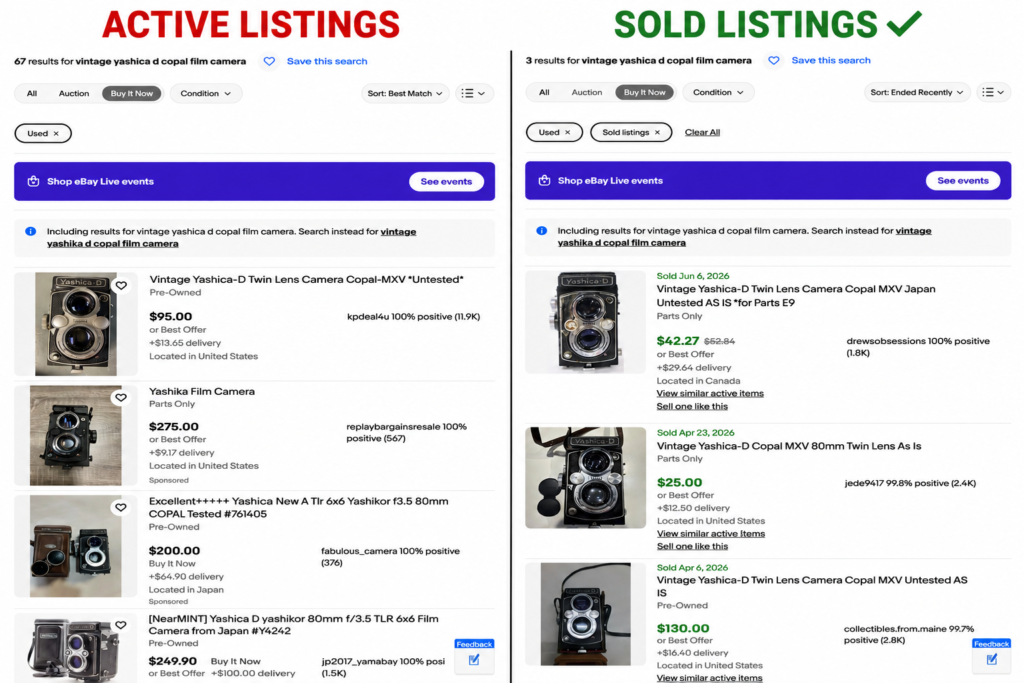
When I first started selling on eBay, pricing was one of the hardest parts of the entire process.
I wasn’t sure whether I should price my items high, low, or somewhere in the middle. I’d spend way too much time comparing listings and wondering if I was making a mistake.
Eventually I realized something.
There usually isn’t one perfect price.
There’s simply a reasonable price that gives your item a good chance of selling while still making you the profit you’re looking for.
Today, pricing is one of the fastest parts of my listing process because I follow the same basic routine almost every time.
My Pricing Process
Whenever I list an item, my process usually looks something like this:
- Search for the item.
- Filter by Sold Listings.
- Filter by Used.
- Look through several recent sales.
- Compare my item’s condition to those listings.
- Check whether my version has anything unique or more valuable.
- Choose a fair price and move on.
It sounds simple because it is.
The mistake I made early on was thinking pricing had to be perfect. It doesn’t.
Always Start With Sold Listings
The first thing I look at is never active listings.
It’s sold listings.
Anyone can ask $500 for an item.
That doesn’t mean anyone is actually paying $500.
Sold listings tell you what buyers have already been willing to spend, and that’s much more valuable than seeing what sellers hope to get.
I also don’t focus on just one sale.
Instead, I look through several recent sold listings to see what price keeps coming up.
I’m usually looking for the middle of the market—not the highest sale and not the cheapest one.
I also use fixed-price listings rather than auctions. I explain why in Auction vs. Buy It Now on eBay: Why I Use Buy It Now.
I Filter to Used Immediately
This is something that’s specific to how I run my business.
Almost everything I sell is used electronics, older collectibles, or discontinued items.
So after I search for an item, I almost always filter the results to Used.
Otherwise, eBay fills the page with brand-new products from large sellers and overseas manufacturers.
There’s nothing wrong with those listings—they’re just not relevant to what I’m selling.
Filtering to Used gives me a much better comparison for my own inventory.
Nearly everything I sell falls into categories like used electronics, discontinued products, and older collectibles. If you’re looking for ideas on what consistently sells, check out What Actually Sells on eBay (Real Items That Make Money Fast)
Compare More Than Just the Price
Once I find sold listings, I don’t immediately look at the numbers.
I look at the pictures.
How clean is the item?
Does it include the original box?
Are accessories included?
Is it scratched?
Is it bundled with something else?
Is it a special edition?
Those little details can make a surprisingly large difference in value.
Two items may look identical at first glance, but one can easily be worth quite a bit more.
Make Sure You Know Exactly What You’re Selling
One of the biggest mistakes I see sellers make is not researching the exact version they have.
For example, I once saw someone selling a Microsoft Zune.
Their title basically described it as a silver Zune with the storage capacity.
Technically they weren’t wrong.
But after doing a little research, it turned out to be a Zune HD Platinum, which is a more desirable version.
A better title would have included the correct model, the Platinum color, and other details buyers search for.
Because they didn’t identify exactly what they had, they probably left money on the table.
This applies to far more than just Zunes.
The more electronics you handle, the more you’ll notice that tiny model differences can completely change an item’s value. That’s one reason I always recommend learning how to properly test and identify electronics before listing them. I cover my testing process in How to Test Electronics for eBay
Whether it’s an iPod, a video game, a camera, a Magic card, or almost anything else, spending a few extra minutes identifying the exact version can make a big difference.
Don’t Be Afraid to Use eBay’s Research Tool
Most of the time, sold listings are enough.
But sometimes I want to see a bigger picture.
If you’re using eBay on a desktop, you can go to your Seller Hub, click Research, and use eBay’s product research tool.
It lets you look back 30 days, 90 days, six months, one year, two years, or even three years.
You can also see graphs showing how often an item sells and how prices have changed over time.
I don’t use it for every listing, but it’s a great resource when pricing something uncommon or expensive.
Be Honest About Condition
When I compare my item to other sold listings, I try to be honest about its condition.
If mine has more scratches than average, I’ll price it accordingly.
If it’s exceptionally clean, I may price it a little higher.
Personally, I’d rather describe something slightly more conservatively than accidentally oversell it.
Being honest helps reduce returns, unhappy buyers, and unrealistic expectations.
Don’t Chase Every Last Dollar
This lesson took me a long time to learn.
Sometimes you buy an item thinking it’s worth more than it actually is.
It still happens to me occasionally.
Nobody likes losing money, and I’m no different.
Sometimes I’ve held onto an item because I didn’t want to accept that I made a bad buy.
But over time I’ve learned that sometimes it’s better to cut your losses, sell the item, and move on.
Every mistake teaches you something.
I’d rather learn from one bad purchase than let it sit on my shelf for years because I’m too stubborn to accept reality.
Best Offer Can Work—Within Reason
I like using Best Offer on many of my listings.
It gives buyers some flexibility, and sometimes people simply enjoy feeling like they negotiated a deal.
That said, not every offer deserves serious consideration.
If someone offers 50% of my asking price, we’re probably not even in the same ballpark.
I usually don’t spend much time thinking about offers like that.
In my experience, offers around 15% to 20% below asking price are much more reasonable.
The reason buyers make extremely low offers is simple: sometimes sellers actually accept them.
If that strategy has worked before, they’ll keep trying it.
Set It and Forget It
One thing I don’t do is constantly change my prices because another seller listed something for a few dollars less.
Price is only one part of the equation.
Photos matter.
Feedback matters.
Shipping speed matters.
Condition matters.
Trust matters.
Instead of chasing every competitor, I simply list my item at a price I’m comfortable with and let the market do its thing.
If an item sits for a long time, I’ll gradually lower the price over time.
I don’t slash it overnight.
I slowly work my way down until it sells.
Experience Makes Pricing Faster
When you’re new, it’s completely normal to spend extra time researching.
Go slowly.
Learn how to compare listings.
Learn what details affect value.
After you’ve done it dozens or hundreds of times, you’ll start recognizing patterns much faster.
Today, pricing usually only takes me a minute or two because I’ve repeated the process so many times.
That experience didn’t happen overnight.
It came from listing thousands of items.
Final Thoughts
Pricing on eBay doesn’t have to be stressful.
Start with sold listings.
Filter to Used if that’s what you sell.
Compare condition honestly.
Research the exact version of your item.
Don’t obsess over finding the perfect price.
A fair price that gets your listing live today is almost always better than spending half an hour trying to squeeze out a few extra dollars.
The more experience you gain, the faster—and easier—pricing becomes.
New to Reselling? Start Here
If you’re just getting started, these posts will help: